CPSC 2020 Fundamentals of Computational Thinking
About Me
- Professor Craton
- Father of two kids - Josiah (3) and Benji (10)
- Married to Karin
- We live in Anderson near campus
Academic Career
- BS in Computer Engineering
- MA in Higher Education and Student Development
- MS in Computer Science
Professional Career
- Software Engineer Team Lead at Genesys
- Software Consultant
Anything you want to know about me?
Introductions
- Name
- Favorite place you went over the break
Syllabus
Quizzes
- Given regularly at beginning and end of class
- Allow me to confirm that everyone is keeping up with course material
General Advice
Try New Things
- College is a time for experimentation and growth
- Get involved with the community
A ship in port is safe; but that is not what ships are built for. Sail out to sea and do new things.
John Augustus Shedd
Growth Mindset
- Talents can be developed
- Learning requires effort
- Your math skills are not “bad” in a fixed sense
- Skills have room to grow
Comparison
- Try not to compare yourself to others
- Compare yourself to yourself in the past
Never be the brightest person in the room; then you can’t learn anything.
James Watson
Intentional Effort
- Growth requires effective practice
- Plan to put in time to learn the topics that matter
The most dangerous way to lose time is not to spend it having fun, but to spend it doing fake work.
Paul Graham
Reading for Tomorrow
Why Computation?
Any sufficiently advanced technology is indistinguishable from magic.
- Arthur C. Clark


Antikythera Mechanism
- Oldest known computer
- Dated to around 200BCE
- Found in a shipwreck off the coast of the Greek island Antikythera in 1901
- Accurately computes positions of astronomical bodies and dates of eclipses


What did you learn about bicycles?
Why did we read about bicycles?
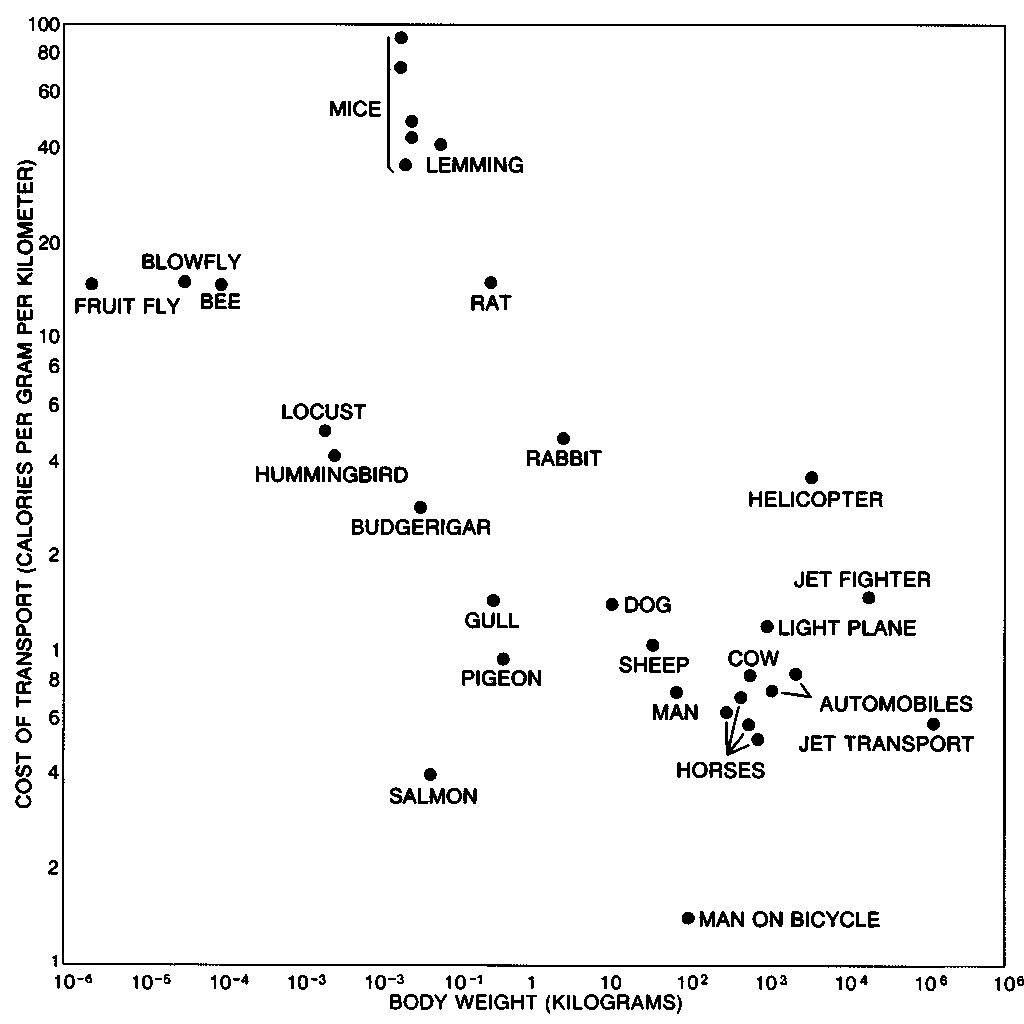
To me programming is more than an important practical art. It is also a gigantic undertaking in the foundations of knowledge.
David Sayre
What are computers capable of?
Capabilities
- Perform mathematical operations
- Store data
- Retrieve data
How do computers function
- Retrieve information from data storage (RAM, drives, network, etc)
- Perform mathematical operations on data
How does the computer know which operations to perform?
Solving Problems
- In order to solve complex problems, we need to decompose them to subproblems solvable with simple instructions
- Computers (or humans) can execute the basic instructions
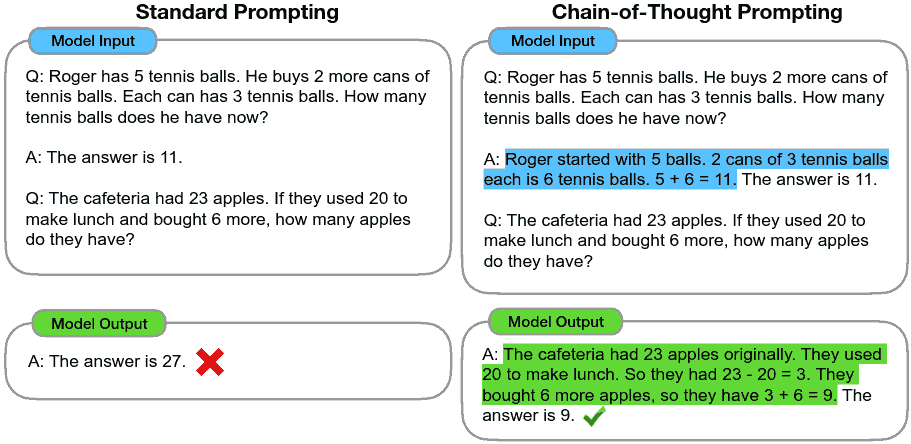
Executing Instructions
- Computer programs are instructions to follow to solve our problem
- Instructions must be complete and unambiguous
- It is not easy to craft correct instructions
Instruction Example
Instructing Computers
Telling a Computer What to Do
- Natural Langugage
- Applications
- Programming
Natural Language
- Comfortable for humans
- Lacks specificity
- Lacks precision
- Difficult for computers to interpret perfectly
Ambiguous Language
The professor said on Monday he would give an exam.
Ambiguous Language
One morning, I shot an elephant in my pajamas. How he got in my pajamas I don’t know.
—Groucho Marx
Large Language Models
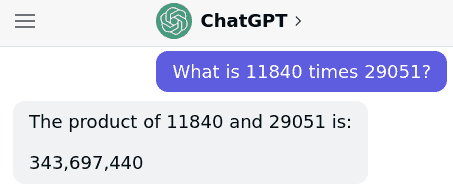
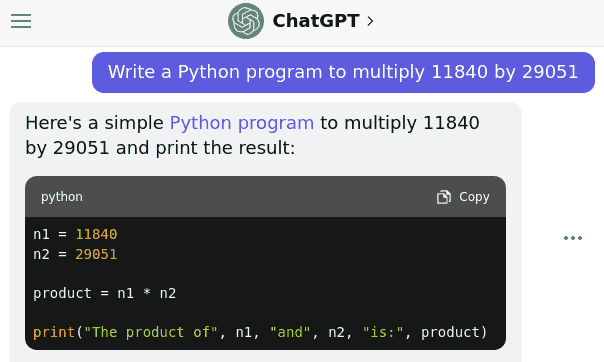
- Completions are inherently stochastic
- Results may not be exactly correct or what a user intends
- Need precise inputs to match precise requirements
Large Language Models
- Incredibly powerful tools
- Growing more powerful rapidly
- Still require expert knowledge for many use cases
Apps
- Another approach to instructing computers
- Work well for pre-defined tasks
- Must be created by someone
Programming
- Provides direct instruction to the computer
- Can be used to compute anything computable
- This can do nearly anything
Programming
- Not just for experts
- Can be a satisfying, creative experience
- Opens up new means for intellectual expression
- Is basically a superpower
Programming Challenges
- Learning a new language
- Understanding what computers can do efficiently
- Solving problems algorithmically
Problem Solving
- Required to program computers
- Analysis at appropriate level of abstraction
Computational Thinking
Formulating problems such that solutions can be represented as computational steps
Process
- Problem Formulation - Conceptualize a problem
- Solution Expression - Formulate unambiguous algorithm
- Execution - Computer runs instructions to produce result
- Evaluation - User explores result to confirm thinking
Algorithm
- Step-by-step process to solve a problem
Example Problems
Simple Computer
- Tape-based computer with programmable head
- The number under the head can be
scanned - One number can be
storedin the head - A
counterin the head can be incremented


Instructions
- Move head left
- Move head right
- Stop if
scannedis empty - Stop if
scannedmatchesstored - Increment
counter - Increment
counterifstoredmatchesscanned - Repeat
Count the number of items on the tape
counter should be equal to the count of the items on the
tape when the machine stops
Counting
- Stop if
scannedis empty - Increment
counter - Repeat
Search through list for an item matching stored
The machine head should stop with the head on the first match if there is a match or stop after the end of the list if there is no match.
Search
- Stop if
scannedmatchesstored - Stop if
scannedis empty - Move head right
- Repeat
Count the number of matching items in a list
counter should be equal to the count of matching items
on the tape when the machine stops
Counting Matches
- Increment
counterifscannedmatchesstored - Move head right
- Stop if
scannedis empty - Repeat
Expressions
Definition
An expression is a syntactic entity in a programming language that may be evaluated to determine its value.
Syntax
- Rules that define the combinations of symbols that are considered to be correctly structured
- There are certain symbols that can be combined in certain ways to produce correct expressions
Evaluation
- Transformation of expression syntax to the value of the expression
- Form of computation
Example
Evaluation in Python
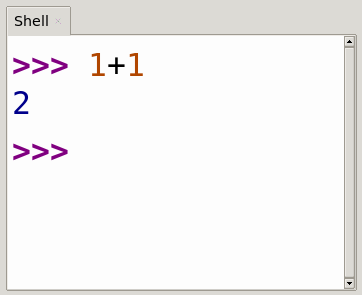
- Expressions in programs are evaluated automatically
- Single expressions can be quickly evaluated using the Shell
Literals
- Basic components of expressions
- Evaluation yields on object of a given type
Binary Arithmetic Operators
+Addition-Subtraction*Multiplication/Division
Arithmetic Examples
Value
- Result object yielded by an expression
- Has a type such as integer or string of characters
- Examples:
"Hello, World!"(string)7(integer)
Types
- Set of allowed values for an object
- Built-in examples include numbers and strings
Numbers
- Numeric values
Strings
- An ordered collection of characters
- Delineated by single or double quotes
Order of Operations
Follows conventions from algebra
- Parenthetic subexpressions
- Exponentiation
- Multiplication and division
- Addition and subtraction
Examples
Comparison Operations
- Always return
TrueorFalse
| Operator | Name |
|---|---|
< |
Less than |
> |
Greater than |
<= |
Less than or equal |
>= |
Greater than or equal |
== |
Equal |
!= |
Not equal |
Examples
Logical Operations
- Always return
TrueorFalsewhen operating onTrueandFalsevalues - Examples include:
notandor
And Truth Table
| A | B | Q |
|---|---|---|
| F | F | F |
| F | T | F |
| T | F | F |
| T | T | T |
Or Truth Table
| A | B | Q |
|---|---|---|
| F | F | F |
| F | T | T |
| T | F | T |
| T | T | T |
Examples
What is the truth table for the following expression?
Order of Operations
Follows conventions from algebra
- Parenthetic subexpressions
- Exponentiation
- Multiplication and division
- Addition and subtraction
- Comparison
- Logical operations
Official Documentation
Variables
Definition
A variable is a named container for a value
Statements
- A statement is a unit of code that the Python interpreter can execute
- Example:
print("Hello, world")
Assignment Statement
- Creates or rebinds a variable
- Gives the variable a value
Variables
- A variable is a named container for a value
- Useful for organizing data flow
- Provide human-readable names for values
- Allow values to be reused
Example
Variable Names
- Should document what the variable is used for
- May include letters and numbers
- Should be lowercase
- May not begin with a number
Reserved Words
Reserved words may not be used as variable names
and     continue  finally  is        raise
as      def       for      lambda    return
assert  del       from     None      True
async   elif      global   nonlocal  try
await   else      if       not       while
break   except    import   or        with
class   False     in       pass      yield
Input Statement
input(prompt=None)- Accepts user input as an
str(string) promptwill be shown to user if provided- Documentation for input
input Example
int
intconverts strings to integers
Examples
Example Program
Lab Notes
Assignment
- Used to store values for later use
Converting to Integers
intcan be used to convert values into integers
type
typecan be used check the type of a value
Storing converted values
intdoes not modify value in place- Results must be stored or used
Getting Help
- Reach out if you need help on a lab
- Other students can be a great source of help
- Learn to know when you are using other resources as a crutch
Conditional Execution
Control Flow
- By default, the Python interpreter runs the next instruction in our program
- In order to create more complex programs, it is helpful to choose which instruction runs next
- This is modification of the control plane of program execution
if statement
- Conditionally runs a block of code
- A Boolean expression (the condition) follows the if statement
- The
ifstatement is terminated by a:
Example
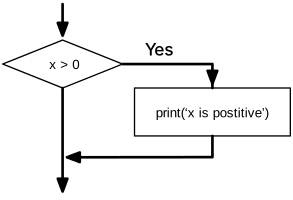
if control flow
diagramCompound Statements
- Statements may be grouped together into blocks
- Blocks of statements should be indented using 4 spaces
Example
New Operations
Integer division
//performs integer division%is the modulo operator and computes the remainder after division
Division Example
Modulo Example
Why would we want a modulo operation?
Even or Odd
Alternative Execution
Else
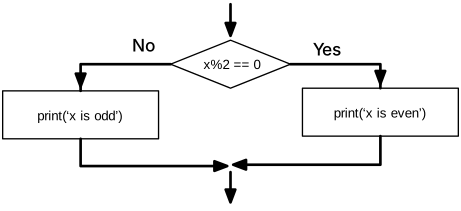
- We may want to run something else when the
ifcheck fails - This can be accomplished using
else
Example
Example
Chained Conditionals
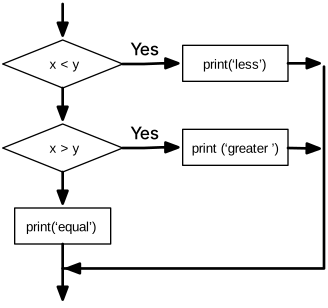
- We may want more than two branches of execution
- We can chain multiple conditionals to achieve this
Chained Conditionals
Improved printing
- The print function will accept multiple items to print
- Items must be separated by commas
Print Example
Printing a name
Basic string operations
- Concatenation can be performed using the
+operator - Duplication can be performed using the
*operator - Comparison can be performed using standard comparison operators
Example
Nested Conditional Execution
Review
ifconditionally executes codeelifconditionally executes alternative codeelseexecutes if no other conditions are met
Nesting Conditionals
- We can nest blocks of code
- Conditional execution can be nested to create more complex control flow
Example
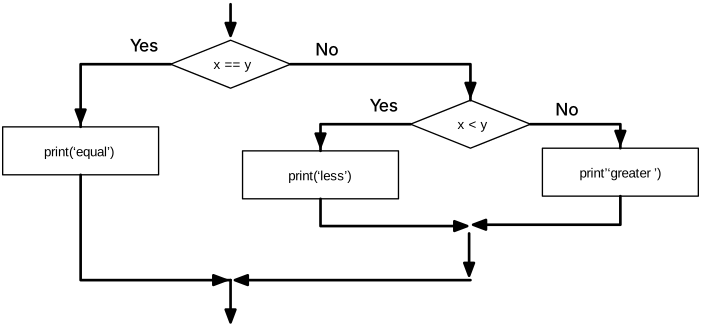
How would we approach building a quiz like this?
Process
- Problem Formulation - Conceptualize a problem
- Solution Expression - Formulate unambiguous algorithm
- Execution - Computer runs instructions to produce result
- Evaluation - User explores result to confirm thinking
Star Wars Quiz
Style
- Deep nesting can become difficult to read
- As a rule of thumb, we’d like to avoid nesting more than 3 layers deep
- Lines should not exceed 79 characters (PEP8)
Exit
exitcan be used to immediately terminate a program.
Exit Example
Key Topics to Date
inputandprintstatements- Arithmetic expressions (
2 + 3) - Comparison operators (
2 <= 3) - Assignment statements (
a=3) - Conditional execution (
if,elif,else)
Lab Questions
Pokemon Nesting Example
Exceptions
Failure
- Code can fail for a variety of reasons
- Some errors can be caught before the program is run
- Others must be handled during runtime
Example
Exceptions
- Raised when error occurs during runtime
- Immediately ends the program with an error message*
Example
Catching Exceptions
- It is possible to continue execution after an exception is raised
- This requires us to catch the exception from a
tryblock
Example
Processing Exceptions
- Report the error to the user
- Try again
- Do something else
Try again
Do something else
Catching all exceptions
- By default, all exceptions are caught by except
- This can cause problems
- You generally want to avoid catching all exceptions
Example
Ignoring Exceptions
- We should almost never ignore exceptions
- It is possible to ignore them using
pass
Pass
Pass keyword
- The
passkeyword is valid in many places - It is not explicitly related to exceptions
- It simply indicates that while a statement is expected, we don’t have anything to do
Example
Functions
A function is a named sequence of statements that performs a computation
Calling Functions
- We’ve already done this
- Use the function name followed by parens containing arguments to pass
Example
intis a function- It takes one argument and returns a value
Return value
- The name for the value returned from a function
Built-in function
- Python includes many functions that we may have use for
Input
- Displays an optional prompt and returns user input
min and max
minandmaxreturn the minimum and maximum of their arguments
Iterables
minandmaxcan also operate on iterables such as strings
len
lencan be used to return the length of a value
Type conversions
int,float, andstrcan be used to convert types
Modules
math
- The math module can be used to access various math functions
import mathcan be used to create the math object used to access the module- A module is a file containing Python definitions and statements
Dot notation
- Modules contain functions and variables
- These can be accessed using the
.character
Example
help
helpcan be used to provide information about an objecthelp(math)provides information about available math functions
random
- The random module provides access to pseudorandom numbers
- These numbers will appear random, but are generated deterministically
- They should not be used in cryptography
Example
randint
randintreturns a random integer between bounds
choice
choiceselects one item from an iterable
Creating Functions
Function definition
- Specifies the name of a new function
- Specifies the sequence of statements that execute when the function is called
- The function can be reused throughout the program
Flow of Execution
- Programs generally run from top to bottom
- Function definitions are not executed
- Functions run only when called
Example
Void functions
- Void functions do not return a value
- They may still do useful work
printis an example of a void function
Fruitful functions
- Fruitful functions return a value
- This value can be used later in your programs
inputis an example of a fruitful function
Example
Parameters and arguments
- Arguments are the values passed to a functions
- Parameters are the variable names used inside the function
Return
- Return allows us to terminate a function and return control to the caller
- If used with a value, the function returns the value
We can reimplement min ourselves
Functions may call other functions
Example
Recursive functions
- Functions may call themselves
- This must be done carefully to avoid infinite recursion
Important Dates
Exam 1
- February 23th
- In-class Canvas exam
- May use a single-page, hand-written note sheet
Testing
How do we know if software works?
Software testing is the act of checking whether software satisfies expectations.
Testing
- Determines correctness in some scenarios
- Will not find all bugs
How do we know if this code works?
Test Cases
- We can confirm known outputs
assertis a simple tool for thisassertwill raise an exception if its input expression iffalse
assert
Square with Tests
Types of Tests
- Unit - Tests individual parts of the system
- Integration - Tests components integrated from smaller components
- End-to-end - Tests an entire system
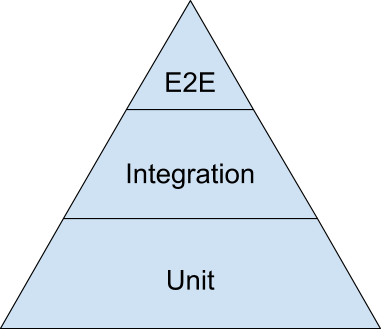
Lab Feedback
Managing State
Testability
- In order to test code, it helps for it to be written with tests in mind
- Isolation of functionality is important
Readability
- Code that is easier to test is often easy to read
- Breaking code at distinct test boundaries can simplify the architecture
Pure Functions
- No side effects
- No reliance on external state
- Always return the same output given the same inputs
Pure Function
Impure Function
Global State
- Global state exists for the life a program
- Local state exists in a section of code
- Code that references global state can be more difficult to reason about
Local Variables
- Are only defined within a function
- Torn down when function terminates
- Useful for storing temporary data
Local Variable
Global Variable
- Defined over the entire scope
- Torn down only on program termination
- Useful for storing global data
Global Variable
How would we test get_tip?
State
- Managing state is critical for creating readable code
- Testability is enhance when we limit external state
Modular Design
Modular design emphasizes separating the functionality of a program into independent, interchangeable modules, such that each contains everything necessary to execute only one aspect of the desired functionality.
Separation of concerns is a design principle for separating a computer program into distinct sections.
Separation of Concerns
The separation of concerns, which, even if not perfectly possible, is yet the only available technique for effective ordering of one’s thoughts, that I know of.
Edsger Dijkstra
Boundaries
Architectural boundaries should be separated so that changing one part of the system has no effect on any other part of the system.
Bob Martin
Examples
Bank Application
- Check balance
- Deposit
- Withdraw
- Complete Example
Rock Paper Scissors
- Get user input
- Select a computer input
- Determine a winner
- Display the results
Exam Review
Key Topics
- Computational Thinking
- Expressions and Variables
- Conditional Execution
- Functions
- Testing
Computational Thinking
- Breaking problems down into computational steps
Expressions and Variables
- Expressions can be evaluated to produce a value
- Variables are named containers for values
Conditional Execution
ifcan be used to conditionally execute a section of codeelifandelsecan provide alternatives
Functions
- Functions provide named sets of instructions that can be called
- Many built-in functions exist (
input,min, etc) - Custom functions can be created using
def
Testing
- Software testing is the act of checking whether software satisfies expectations
- Testable code is often more modular and easier to reason about
Midterm Survey
Iteration
Assignment
- Variables can be assigned values
Updating Variables
- Sometimes we want to update the values in variables
- We can set variables to expressions that include those variables
Increment and Decrement
- Increment is increase by 1
- Decrement is decrease by 1
Augmented Assignment
We can shorten common reassignment using augmented assignment:
Recursion
- Functions can be use to create repetition in our programs
Example
while
- Repetition in programs is a common task
- We introduce
whileto perform operations multiple times
Example
Indefinite iteration
- We do not specify how many times a
whileloop will execute in advance - This makes iteration indefinite
Controlling Iteration
whileaccepts a conditional that will stop iteration when false- This can be used to control how many times we iterate
Counting
Infinite Loop
- We must be careful to avoid looping forever
- A loop that never stops is called an infinite loop
- This is a common type of bug
Infinite Loop
break
breakcan be used to terminate iteration- Control moves to after the loop body
Example
continue
continuecan be reused to skip the remainder of an iteration- Control will return to the conditional on the while statement
Example
Exercise
Use the following to get problem input:
Definite Iteration
Definite Iteration
- We frequently want to iterate a fixed number of times
- We may want to iterate over a fixed number of items
- Definite iteration provides a tool for this
for
- The
forkeyword provides definite iteration - It will iterate over all items in the supplied iterable
Print characters in a word
Solution
Count letters in a word
Solution
Sum of digits in a number
Solution
Word counter
Solution
break and continue
breakandcontinuecan be used with for as expected
Lists
- A list is a sequence of values
- Lists are defined using square brackets (
[and]) - Lists can be iterated using
for
List example
Lists
- Lists are covered in much more detail in chapter 8
range
rangeis a function that returns value for use in iteration- It can provide a quick way to create a definite loop when combined
with
for
range example
range parameters
- start - Where to start counting from
- stop - When to stop counting (exclusive)
- step - Number to count by (1 by default)
range parameter example
else
forsupports an else clause- It will be executed if the loop is not interrupted
else example
Loop Patterns
Construction
- Initialize variable before the loop starts
- Perform computation on each loop item
- Examine variable after the loop completes
Counting
Solution
Sum
Solution
Counting and Summing
- Helpful pattern to understand
- Can be easily replaced by
lenandsumin simple cases
Mean
Solution
Could we compute the mean without using a loop?
Solution
Word Count
How can we count the words in a string?
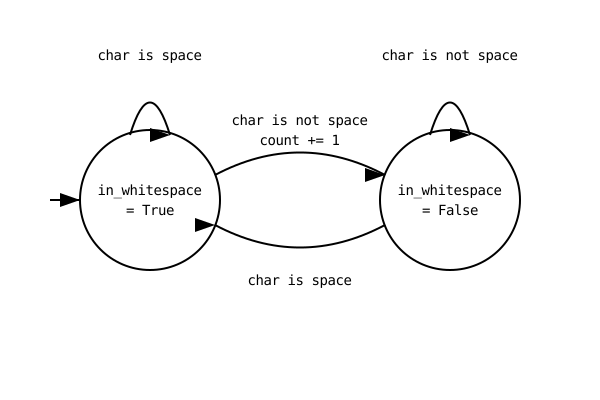
Maximum and Minimum
- Sometimes we want to compare one value to others
- Examples include finding a max or a min
Max
Solution
Min
Solution
min function
Solution
Linear Search
- Sometimes we want to find a specific value
- This can be accomplished by checking items one by one
Check if a word has no vowels
Solution
Strings
Definition
- A string is a sequence of characters
- String literals can be created using single or double quotes
Valid Strings
Accessing Items
- A string is a sequence
- Items in the sequence can be accessed using square brackets
[]
Example
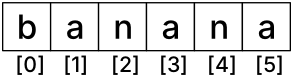
Immutability
- Strings in Python are immutable
- This means they cannot be changed
Example
Creating a New String
- If we need to change a string we must create a new modified version
- This can be accomplished using string expressions
Looping
- Strings are iterable
- We can easily loop over the characters in a string using
for
Example
in
- The
inoperator can be used with strings - An
inexpression will return true if the value on the left is contained within the value on the right
Example
String comparison
- Comparison operators are defined for strings
==checks for equality as expected<and>are a little more complicated
Example
Alphabetical order
- Generally, comparison operators can be used to confirm whether strings are in alphabetical order
- All uppercase letters come before all lowercase letter
Example
Create a program to print every other letter in a string
Create a program to find a word in a string and print the position of the word
Solution
String Methods
Methods
- Methods are functions that operate on a known piece of data
- Most operators are shortcuts to object methods
Example
dir
dircan be used to list methods available on an object
Example
upper and lower
uppercan be used to uppercase a stringlowercan be used to lowercase it
Example
How could we compare strings ignoring case?
Solution
find
findcan be used to get the position of a substring- Returns the index of the start of the substring
- Returns -1 if substring is not found
Example
strip
stripreturns a copy of the string with leading and trailing whitespace removed
Example
startswith
startswithwill return True if the string begins with the supplied prefix
Example
count
countwill count the number of non-overlapping substrings in some text
Example
Slicing
- String indexing in Python supports returning substrings as well as individual characters
- A colon (
:) is used to separate the start and end index
Example
Negative Indexes
- In Python, it is legal for an index to be negative
- A negative index will index from the end of the object
Example
Inferred indices
- If a start index is left out, it is assumed to be the start
- If an end index is left out, it is assumed to be the end
Example
Formatted String Literals
format
- Prior editions
of the textbook used the
formatmethod on strings - It is antiquated and has largely been superseded by f-strings since Python 3.6.
- You will not be required to use or understand the
formatmethod in this class
f-strings
- Provide simple string formatting
- Python expressions can be included within strings
- An
fshould be used before the opening quote of the string literal
Example
Example
Format Specifiers
- Can be added after an expression to adjust formatting
- This can be used for rounding or other purposes such as alignment
Example
Example
Create a program that will capitalize the first word in a provided sentence.
Solution
Create a program that will search a string for a word and display the word along with the 5 characters before and 5 characters after it.
Solution
Files
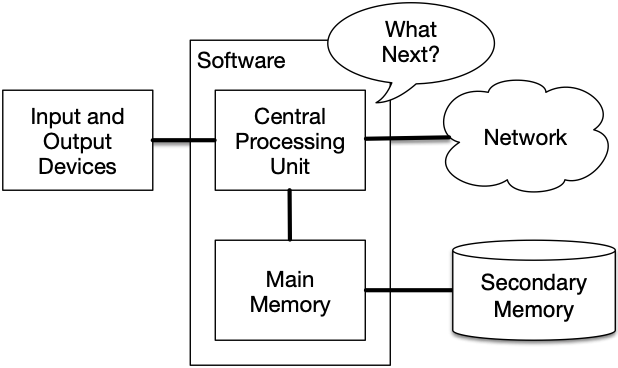
Storage
- Instructions are executed by the CPU
- Values and variables as discussed so far live in main memory
Persistence
- Main memory is cleared when unpowered
- Long-term storage must use secondary memory


Files
- Files are the abstraction used for long-term storage
- Files are typically organized in a hierarchy
- Files typically have human-readable names
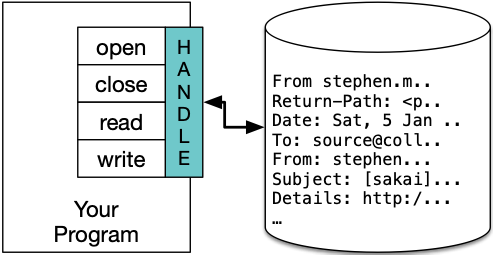
Opening Files
- The
openfunction may be used to open a file - It requires a filename as a parameter
- It returns a file handle
Read Example
Closing Files
- When we are finished with a file, we should close it to free resources in our programs
Close Example
Reading Closed File
Lines
- Plain text may be separated into lines for easier consumption
- Lines are separated by a special character called a newline
- We can create a newline character in Python using a
\nescape sequence
Example
Reading Lines
- It may be helpful to read a file one line at a time
- Paragraphs may be represented this way in documents
- Data formats may use lines to separate records
Reading Lines
- The
readlinemethod will return the next line as a string value - The
readlinesmethod will return an iterable of all lines - The file handle can be iterated directly to operate on lines
Example
Example
Exercise
- Create a plain text file with numbers on each line
- Create a Python program that prints the sum of the numbers in the file
Solution
Key Ideas
- Main memory is volatile and files provide non-volatile storage
- We can use the
openfunction to get a file handle - We can use
readto load a string from a file
File Exceptions
Errors in Programs
- Sources of errors in programs are numerous
- One common source of errors are incorrect assumptions about the environment in which the program is running
Missing Files
- An attempt to open a file for reading that does not exist will raise an exception
Example
Handling Exceptions
- We can use
tryandexceptto handle these errors
Example
User Selected Files
- File name need not be hard-coded
- Names can be entered by a user
- This makes proper error handling more important
Example
Handling Multiple Exceptions
- File reading may fail due to missing files
- File reading may fail due to invalid access rights
- These can be handled using separate
exceptblocks
Example
Exercise
printall capitalized words in a user-selected file.- Show an appropriate error message if the file is not found.
Solution
Exercise
Count all if, elif, and else
keywords in a program
Solution
filename = input("Filename:")

try:
    handle = open(filename)
except FileNotFoundError:
    print("File not found")
    exit(1)

contents = handle.read()

count_if = 0
count_elif = 0
count_else = 0

for word in contents.split():
    if word == "if":
        count_if += 1
    elif word == "elif":
        count_elif += 1
    elif word == "else":
        count_else += 1

print(f"if: {count_if}")
print(f"elif: {count_elif}")
print(f"else: {count_else}")
Key Ideas
- Reading files creates new surface for errors
tryandexceptcan be used to deal with exceptions- Filenames can be entered by users or come from other dynamic sources
File Writing
File Handles
- Provide an interface to work with an open file
- Common operations include reading, writing, and closing
Reading
- Open a file with default file mode (read)
- Use the read method to move text content from the file to a string
Example
Writing
- Open a file with mode set to “w”
- Use the write method to write to the file
Example
Closing
- Files must be properly closed to ensure all data is correctly written
Example
Truncation
- When a file is opened for writing, it is truncated by default
- This means all existing content will be destroyed
Appending
- Files can be opened for appending using the “a” flag
Example
Exceptions
- An exception crashing the program can prevent a proper close
Example
Closing Files
- It is important to close files when we finish using them
- It can be easy to forget to do this
withcan be used to automatically close a file
Example
with
- The
withstatement can be used with all context manager types - File handles are one use, but there are many others
withalways closes the file, even when exceptions are raised
Exercise
Write the first 1000 positive integers to a file
Exercise
Read the values from that file one at a time and write their squares to a second file
Solution
Key Ideas
- Files can be opened with the “w” flag
- We can avoid truncation with the “a” flag
- The
withstatement can be used to automatically close files
Lists
list
- A list object is a sequence of values
- Values may be of any type
- Values may have different types
Creating a list
- Lists can be created using square brackets enclosing expressions separated by commas
[1, 2, 3]["a", "b", "c"]
Example
Empty lists
- An empty list is a valid data structure
- This is created using square brackets with nothing inside:
[] - Empty lists evaluate to False in Boolean expressions
Example
Falsy Values
- Most Python values evaluate as True in a Boolean expression
- Exceptions include empty containers and 0-valued numerics
- More info
Mutability
- Unlike strings, lists are mutable
- We can change an item inside a list
Example
Mapping
- One way to reason about a list is as a mapping from numbers to elements
- Language of one value “mapping to” another is also useful in later data structures
Indices
- Any integer may be an index
- Indices outside the list will raise an
IndexError - Negative numbers index from the back
Example
in operator
- The
inoperator is supported on lists - It will return True if a given value is found in the list
Example
List Traversal
- A list is an iterable datatype
- We can use for to iterate over the items in a list
Example
Writing List Elements
foris useful for reading, but doesn’t allow modification directly- If we need to write, we need access to an index
- This can be achieved using
lenandrange
Example
Exercise
Create a Python program that will add 1 to every element in a list.
Nested Lists
- Lists can be used as list values
- Nested lists only count as 1 element when computing
len
Example
Exercise
Create a Python program that will count all individual elements in nested lists.
List Operations
List + operator
- The
+operator can be used to concatenate lists
Example
Appending
- The
+operator may be used for appending - Single items must be represented as a list of length 1
Example
Exercise
Create a program that builds a list of 10 randomly generated numbers
Solution
List * operator
- The
*operator can be used to duplicate lists
Example
Slicing
- Lists support slicing as used with strings
- Omitted values will be treated as the start and end of the list
Example
Slices in assignment
- Slices can be used in the left hand side of an assignment
Example
Copying Lists
- Because lists are mutable, it can be useful to create copies
- The
copymethod can be used for this - Slicing syntax (
[:]) can also be used
Example
append
- The
appendmethod can be used to add an item to the end of a list - If lists are passed to append, a nested list will be created
Example
extend
- The
extendmethod can add many elements to a list - The argument passed in should be a list
Example
sort
- The
sortmethod can be used to sort list elements in place - The list will be modified by this operation
sortalways returnsNone
Example
In-place modification
- It can be tempting to assign the result of sort back to the original list
- This is not desirable, as it will replace the value with
None
Example
Exercise
Create a Python program that prints the three largest numbers in a list
Deleting Elements
popwill remove and return an element at a position (or the last element by default)delcan be used to remove the element without returning it (can use slices)removewill remove the element by value
pop Example
del Example
remove Example
Exercise
Create a Python program to remove all single-digit numbers from a list
Lists
List functions
- Many built-in functions can operate on lists
- Examples include
len,max,min, andsum
Example
Numeric lists
- Some functions will only work properly on lists with numeric elements
sumwon’t work properly with strings, for example
Example
List constructor
- The
listconstructor can be used to create a list from a string
Example
Lists and Strings
- A list is a sequence of arbitrary values
- A string is different data type that represents a sequence of characters
- They cannot always be used interchangeably
Example
Example
Objects and values
- Two values can hold the same contents without pointing to the same object
- Consider the following assignment:

is
- The
isoperator can be used to test if two values are the same object
Example
Lists
- Because lists are mutable, a new list is a new object
- Two lists with the same values may not be the same object
Example
List equivalence
- We can also use
==to compare lists - This will perform a deep compare to check if the two lists have identical values
Example
Exercise
Write a Python function that will return True if and
only if the two lists contain the same items but are not the same
list.
Multiple References
- Multiple variable can point to the same object
Example
a = [1, 2, 3]
b = a

print(a is b)
Aliasing
- An object with more than one reference to it is aliased
- Care must be taken when aliasing mutable objects
- A modification to one will affect the other
Example
Lists as arguments
- If a list is passed to a function, it will be aliased
- A modification inside the list will be seen by the caller
Example
Exercise
Adjust the following program so that first_half does not modify the list it is passed
Dictionaries
List
- Lists map numbers to values
- Lists are dense, meaning numbers from 0 up to the list length all map to a value
Dictionaries
- Can also map numbers to values
- Can be sparse meaning they don’t need to map all possible values
- Created using curly braces
{}
Example
Hashable Types
- An object is hashable if it has a hash value which never changes during its lifetime and can be compared to other objects
- Hashable objects which compare equal must have the same hash value
- Hashability makes an object usable as a dictionary key and a set member, because these data structures use the hash value internally
Dictionary Keys
- Integers may be used as keys
- Strings may be used as keys
- Any other hashable type may be used as a key
Example
Exercise
Create a program that builds a dictionary that maps the days of the week to the time you need to wake up on these days.
Printing Dictionaries
- Dictionaries can be printed directly
- They will show value mapping between curly braces
{}
Example
Instantiating Dictionaries with Values
- The output format from the previous example can be used to create new lists directly
Example
Whitespace
- Whitespace may be used inside dictionary declarations
- New lines may be used to organize declarations
Example
in
- The
inoperator can be used inwill return True if the key exist in the dictionary
Example
Exercise
Create a program that can count the number of occurrences of each word in a text
Solution
Iterating over Dictionaries
Iterating over Keys
- The native method to iterate over a dictionary using for will iterate over keys
Example
Iterating over Values
- It is sometimes useful to access just values from a dictionary
- The
valuesmethod can be used to get values as an iterable - Alternatively, we can access values by their key
Example
Example
Working Problems
- Professional developers will frequently be asked to solve simple programming tasks in interviews
- It is important to practice these sorts of problems
- Example problems: LeetCode, Project Euler
Lab Review
Tuples
Container Types
- Strings contain a sequence of characters
- Lists contain a sequence of values of any type
- Dictionaries contain values of any type indexed by key
Tuples
- Tuples contain a sequence of values
- Values may be any type
Tuple Creation
- Tuples are created as comma-separated values
Example
Small Tuples
- A one-item tuple can be created using a trailing comma
t = 1, - An empty tuple may be created using the
tupleconstructor or empty parens (())
Example
Tuple constructor
- The
tupleconstructor can also be used to convert other types into tuples
Example
Tuple Features
- Indexing works like lists for the most part
- Assigning via index is not allowed (like strings)
Example
Immutability
- The container itself is immutable
- Mutable values (such as lists) can still be modified
Example
Destructuring Assignment
- A destructuring assignment can be used to assign multiple values at once
- The right hand side must be the same length as the left hand side
Example
Example
Exercise
Write a concise program to swap the values in two variables,
a and b
Tuple Comparison
- Tuples are compared one element at a time (like strings)
- Once a larger element is found, that tuple is considered to larger
- Future elements are not considered
Example
DSU Pattern
- Uses tuples for sorting items
- Decorate items using a sort key
- Sort items
- Undecorate the items by removing the sort key
Exercise
Write a Python program that creates a list of all words in a sentence. The list should be sorted by the length of the word, smallest first. For example, the sentence “She is a girl” should produce:
['a', 'is', 'She', 'girl']Solution
Tuples
Dictionary Items
itemscan be used to get keys and values from a dictionary
Example
Destructuring and for
- Destructuring can be used to assign multiple variables in a
forloop
enumerate
- enumerate can be used to add a count to iterable items
- The return value from enumerate is an iterable of (count, value) tuples
Example
Enumeration Loops
- Enumeration can be used to avoid manual loops counters in certain loops
Example
Exercise
Use enumerate to print only the letters with an
even-numbered index in a string.
Modifying Lists Items
- Enumeration can be helpful if we need a reference to list items during iteration
Example
Iterating multiple lists
- It can be helpful to iterate multiple lists at the same time
- This can be accomplished with an index
Example
zip
- zip can be used to directly match items from two iterables
- A new iterable is created providing tuples of items from the supplied iterators
Example
Example
Exercise
Use zip to create a list of each pair of letters in a string. For example, the string “abcd” should produce the following list:
Example
List Comprehensions
Creating Lists
- We frequently want to create a list from another list
- This can be accomplished using a
forloop
Example
Map
- The task of building one iterable from another is common
- A special function called
mapis provided to simplify this task maptakes a function and applies it to all items in an iterable return a new iterable
Example
Lambda Functions
- It can sometimes be helpful to create small, inline functions
- The
lambdakeyword can be used to facilitate this
Example
Exercise
Create a square function using lambda
instead of def.
Map and Lambda
lambdaandmapcan be combined to quickly perform operations on entire lists
Example
List Comprehensions
- The pattern of creating one list from another is very common
- Python introduces special syntax to simplify these operations
- This is referred to as a list comprehension
Example
Filtering
- Filtering can be applied to list comprehensions using an
ifclause
Example
Generator Expressions
- Work somewhat like list comprehensions
- Produce generators instead of lists
- Generator wait to compute values until they are needed
Example
Lab 9 Review
Generator Expressions
List Comprehensions
- List comprehensions can be used to quickly build a new list from an existing list
Example
Generator Expressions
- The expression inside a list comprehension is known as a generator expression
- These can be used in other contexts
Example
Generators
- A
generatorobject is an iterable that can only be iterated once - The object cannot be index like a list
- Value are created just in time for their use
Example
for
- Generator expressions can be iterated using
for
Example
Creating Dictionaries
- We can create dictionaries from pairs of values using the
dictconstructor - This technique can be combined with generator expressions
Example
Dictionary Comprehension
- Dictionaries can be quickly created using specialized dictionary comprehension syntax
Example
Custom Generators
- The
yieldkeyword can be used to emit values from generators - Custom generators look like functions but maintain their state between yielding values
Example
Exercise
Create a generator that will yield every odd number that is not divisible by 5.
Project Overview
Web Applications
Local Applications
- Apps created so far are accessible from the local device only
- Basic functions (
printandinput) interact with the system in text mode - These limitation make it challenging to create modern apps
Hypertext
- Text document with links to other text documents
- Provides the basis for the world wide web

HTTP
- Hypertext transfer protocol
- Provides a mechanism to request hypertext documents from remote systems
Flask
- Python package to implement HTTP servers
Example
URL
- Provides a unique identifier for a hypertext document
- Sent by a user agent as part of an HTTP request
HTML
- Hypertext markup language
- Domain specific language used to describe hypertext documents
Hyperlinks
- Created in HTML using
<a>tags - A hypertext reference (
href) may be included to link to another document
Example
Form Example
Extended Example
from flask import Flask, request, session
import languagemodels
app = Flask(__name__)
app.secret_key = "FyJYMJmwZUWASo5J"
@app.route("/")
def home():
if not "history" in session:
session["history"] = ""
usertext = request.args.get("usertext", "")
if usertext:
session["history"] += f"<p>User: {usertext}"
response = languagemodels.do(f"Respond to a user: {usertext}")
session["history"] += f"<p>Bot: {response}"
return f"""
{session['history']}
<form action=/>
<input type=text name=usertext autofocus />
<input type=submit />
</form>
"""Cyber Team Tonight
- Professor Craton will be talking about applications of AI
- 7 pm in Decker 346
Git
Software Size
- One way to measure software size is via source lines of code (SLOC)
- A modern piece of large software, such as an operating system, may have tens of millions of lines of code
Team Size
- Some software is developed by individuals
- Many applications are developed by large teams
- Thousands of developers may work on large application such as Windows or the Linux kernel
How can we help thousands of people work together to write millions of lines of code?
Version Control
- Version control systems are used to manage change to the source code of software systems
- These tools become critical as the size of software and teams increases
Google Docs
History
- Version control systems manage history of the codebase
- Mistakes can be undone
- Previous versions of the software can be used
Git
- Distributed version control system
- Originally developed to manage the source code of the Linux kernel
- Most widely used version control system today
Init
- We can create a new git repository using
git init - This creates the
.gitmetadata directory - This repository will have no commits or pointers to commits
Status
git statuscan be use to check the current state of the repository
Example
> git init
Initialized empty Git repository...
> git status
On branch main
No commits yet
nothing to commit (create/copy files and use "git add" to track)Commits
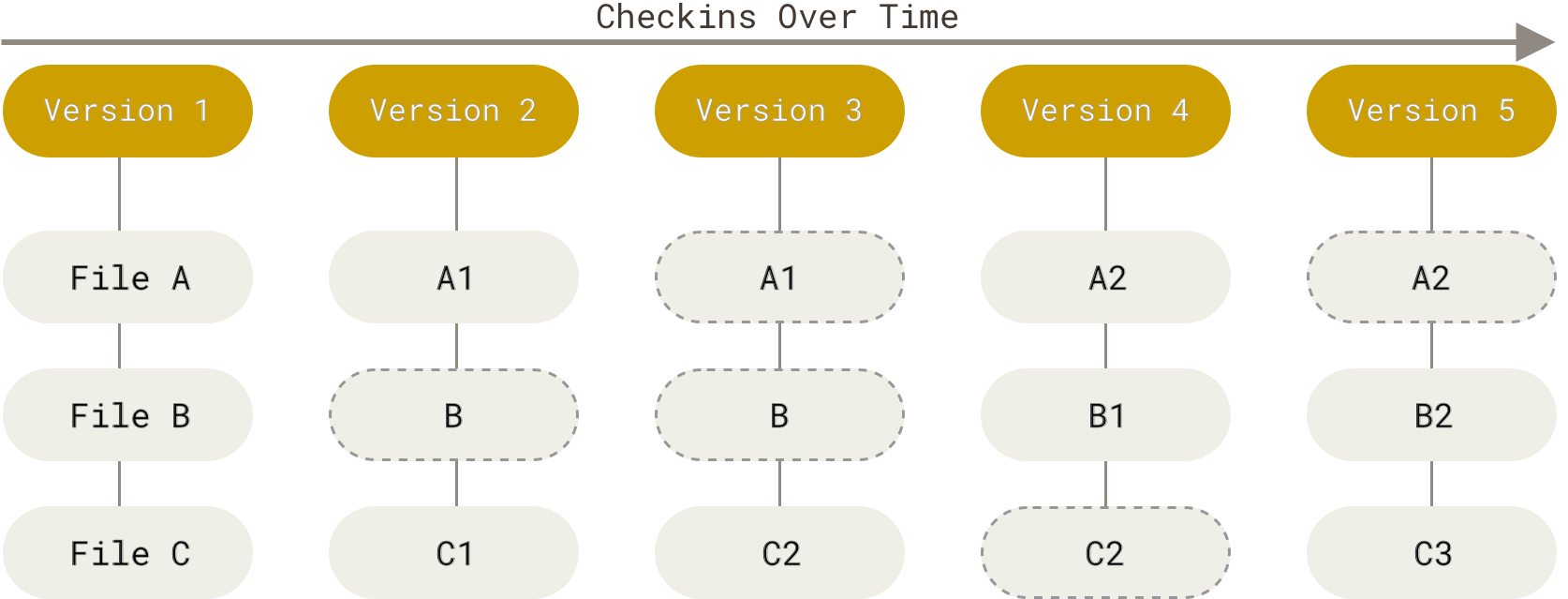
- At its core, git track states of the system known as commits
Staging
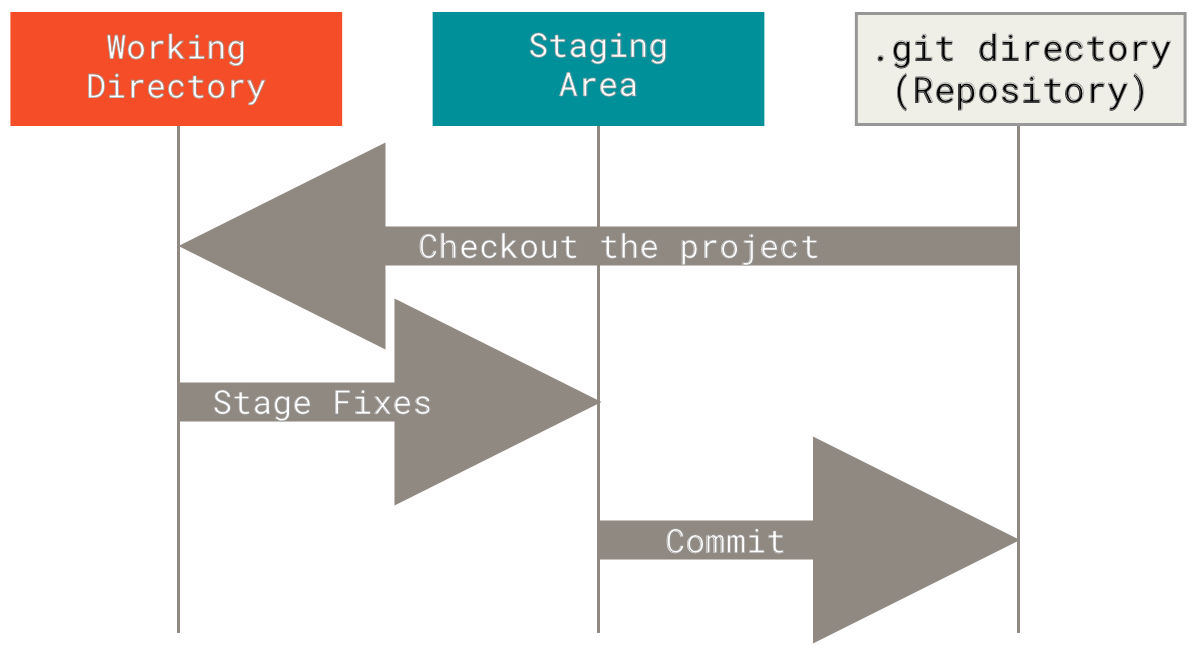
- Before files are committed, they must be staged
Add
git addcan be used to track and stage a file
Example
> git add main.py
> git status
Changes to be committed:
(use "git rm --cached <file>..." to unstage)
new file: main.pyCommit
git commitcan be used to create a new commit- The
-mflag can be used to provide a message - File names can be provided
- The
-aflag will commit all changes
Log
git logcan show the commit history
Vacuum Lab Review
Regular Expressions
find
- The string
findmethod can be used to get the location of one string in another
Example
split
- The string
splitmethod can be used to split strings
Example
Regular Expressions
- Available in the
remodule - Provide their own mini language for parsing strings
- Useful for somewhat advanced string processing tasks
search
- The re
searchmethod can be used to find a matching span in a string - Will return
Noneif no match
Example
Character Matching
- By default, regular expressions match characters literally
- Some special character can create more complex matches
- For example
.will match any character
Example
Exercise
Create a regular expression that can match all 5 letter words that start with “c”
DFAs
Chomsky Hierarchy
Grammar Automaton (Computer)
Unrestricted Turing Machines Context Free Pushdown Automata Regular Finite State Automata
Regular Languages
- Are insufficient to parse most programming languages
- Can be processed by a simple finite automaton
Deterministic Finite Automaton (DFA)
- Finite set of states \(Q\)
- Finite set of input symbols called the alphabet \(\Sigma\)
- Transition function \(\delta : Q \times \Sigma \rightarrow Q\)
- Initial or start state \(q_0 \in Q\)
- Set of accept states \(F \subseteq Q\)
Drawing DFAs
- States are nodes on the graph
- Start state indicated by arrow
- Accept states indicated by double border
- Transitions indicated as labeled arrows
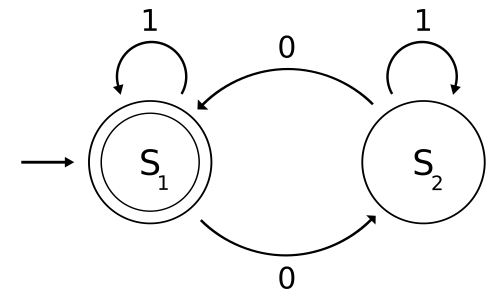
Regular Expressions
Counting Characters
- Count modifiers can be appended to character classes
- One more more can be matched using
+ - Zero or more can be matched using
*
Exercise
Create a single, concise regular expression to match a string with 0
or more a’s followed by at least 1 b followed
by at least 1 c. Examples:
abcbcaabbcc
These should not match:
acbac
match
- Match will return
Trueif a string matches from the beginning
Example
Search
- We have seen that regular expressions can be used for search using
matchorsearch
Example
Data Extraction
- Regular expressions can be used to extract many matches
- The
findallfunction can be used for this purpose
Example
Metacharacters
- Certain characters, such as
.are not matched literally - The full list of metachars is:
. ^ $ * + ? { } [ ] \ | ( )
Character classes
- We can search for groups of characters to match against a single
character using
[] - We can use “
-” to indicate a range of characters
Example
Common Classes
\d- any decimal digit\s- any whitespace\S- any non-whitespace\w- any alphanumeric
Example
Fuzzy matching
- We can use more permissive expressions to capture values in multiple formats
Example
Substitutions
subcan be used to perform regex replacements
Example
Extraction
- Parens
()can be used to indicate which portion of an expression to extract
Example
Exact counts
- Brackets
{}can be used to specify an exact count on the preceding character class
Example
Example
Match Objects
searchreturns a match object on success- Groups can be extracted from the match
Example
Group 0
- Match group
0is always the full match
Example
More RE Information
Advent of Code
- Advent calendar of small programming puzzles
- AU leaderboard (join with 1507160-fceefd29 if desired)
- About Advent of Code 2024
Command Line Interfaces
CLI
- A CLI is a way to interact with a computer by providing lines of text instructions
- Began to replace punched cards in the 60s as a way to interact with computers


Terminal
- Hardware devices used to send and receive text from a computer
- Includes text output and text input
- Modern systems may include virtual terminals

Python REPL
- Accepts and runs Python commands
Example
Shell
- Provides an interface to the underlying operating system
- Shells may be graphical or text-based
Example
- Windows without Explorer
Text shells
- Many operating systems provide a text-based shell
- Examples include cmd (Windows), Powershell (Windows), and BASH (Unix, Linux, and MacOS)
Command Format
Prompt command param1 param2 … paramN- Commands are generally entered following a prompt
- Commands may be internal or call an external program
- Parameters are provides by the user for the command
Working Directory
- Running programs (processes) have a current working directory used to resolve relative paths
- The shell may allow the working directory to be changed
Changing Directories
Listing current directory
- It is frequently helpful to be able to list the current directory
- The
lscommand can be used for this in most shells - Some shells may use
dir
Running a program
- One of the key features of a shell is launching programs
- This is accomplished using commands in text-based shells
Example
Run calculator using Windows:
Run thonny using Bash:
Lab 11 Review
Objects
What is an object?
- Any data with state (attributes or value) and defined behavior (methods)
Common Objects
strintlistrange
State
- Objects are containers for state and behavior
- They may have a value
- They may have attributes
Functions
- Functions are containers for behavior
- They do not typically also store state
Attribute and Method Access
- Attributes and methods are accessed using “
.”
Attribute Example
Methods
- A function that is a member of an object
- When called as an attribute of an object, the function can operate on the object state
Method Example
Class
- A template for creating user-defined objects
- Class definitions normally contain method definitions which operate on instances of the class
- Class names are written in upper camel case by convention
Example
Exercise
Create a Student class with class_level and
gpa attributes
Methods
- Functions defined in the class body become attached to objects
- When called, these have access to the object instance
Example
Exercise
Add a set_gpa method to your Student class
that will set their GPA to a supplied number
Constructor
- A special method may be called when creating a new object from a class
- This is called the constructor
Example
self
- The first argument passed to a method will be a reference to the object instance
selfis chosen as the name for this parameter by convention
Comments
#symbol