Programming Languages and Compilers
About Me
Professor Craton
Anything you want to know?
Introductions
- Name
- What are you hoping to learn from this class?
Syllabus
Quizzes
- Given regularly at beginning and end of class
- Should be easy for you
- Allow me to confirm that everyone is keeping up with course material
Course Overview
Introduction
- 1.1 - 1.3 Why programming languages?
- 1.4 - 1.6 Compilation vs Interpretation
Foundations
- 2.1 - 2.2 Lexing (aka Tokenizing, Scanning)
- 2.3 - 2.5 Parsing - ASTs, Language Hierarchy
- 3.1 - 3.2 Binding and Lifetime
- 3.3 - 3.6 Scope and Closures
- 5 - Target Machine Architecture
Language Design
- 6 - Control Flow
- 7 - Type systems
- 8 - Composite Types
- 9 - Subroutines and Control Abstraction
Programming Paradigms
- 10 - Object Oriented Programming (Python)
- 11 - Functional Programming (JS)
- 12 - Declarative Programming (SQL)
Course Software
- You will need access to an x64 Debian-based Linux system for several of the assignments in this class
- This can be installed directly on most laptops, or you can run it in a VM
- We’ll cover VM setup in the first lab
Introduction
What is a computer?
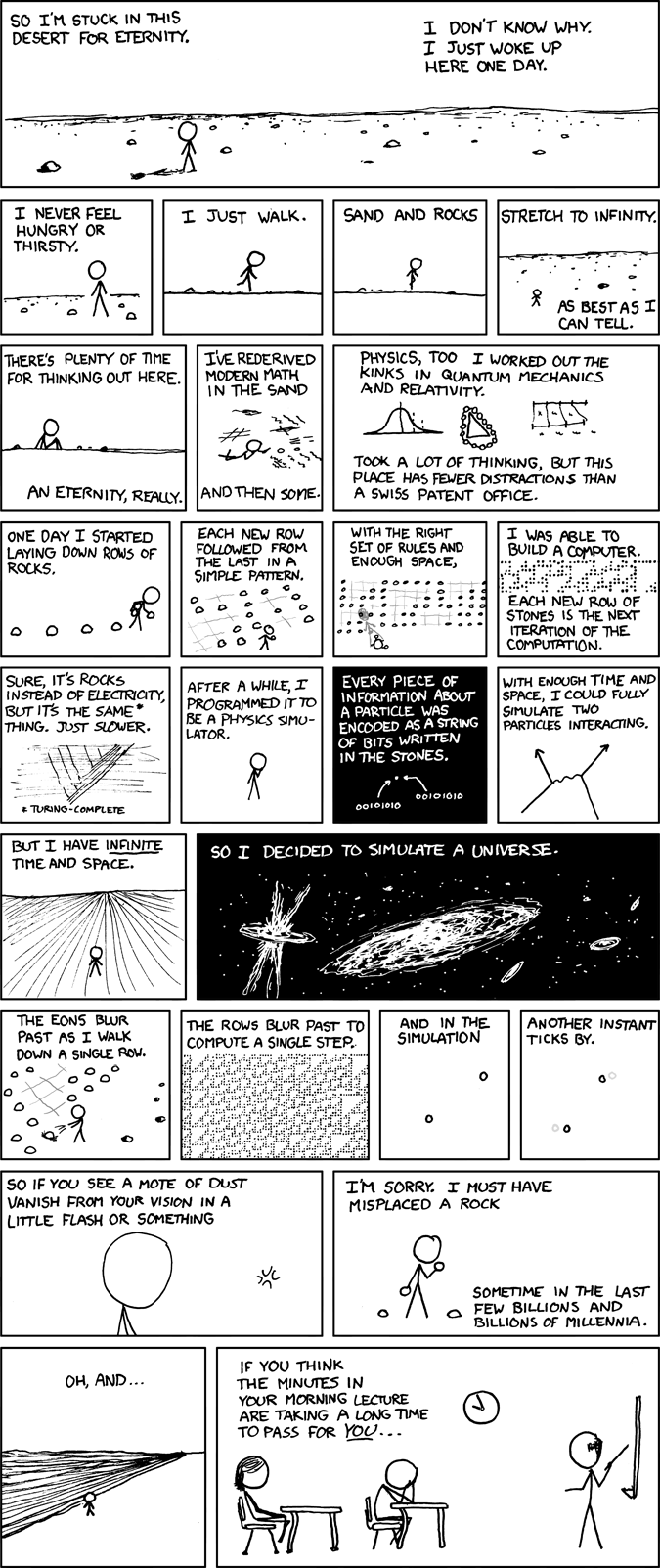
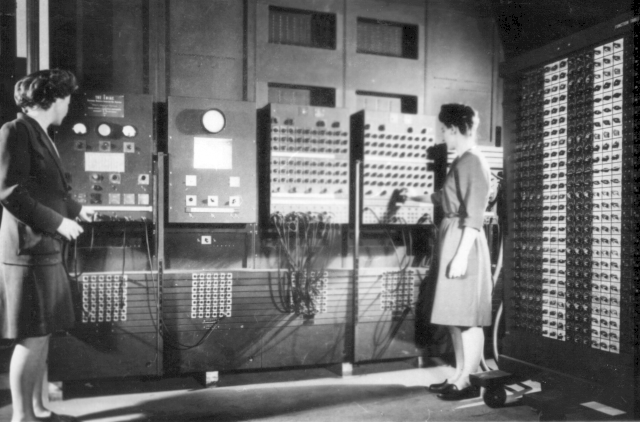
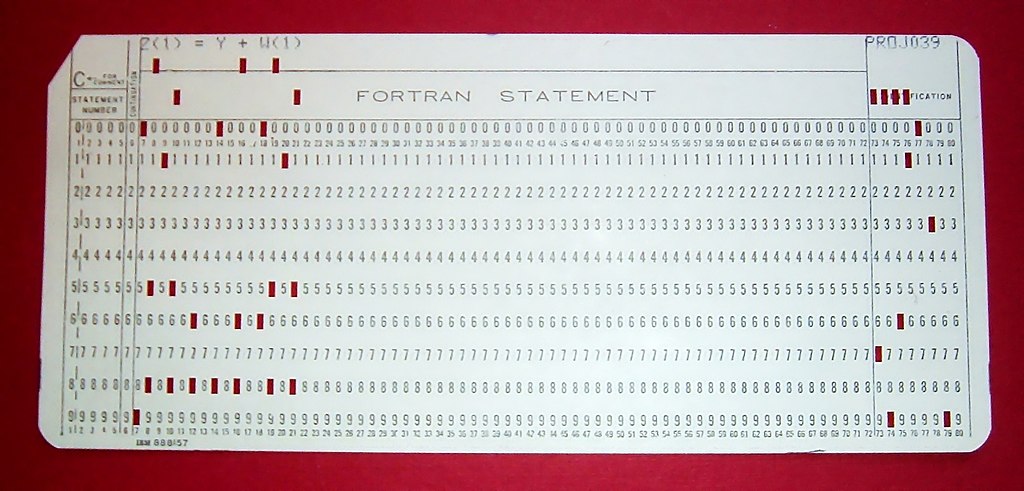
History of Programming
- 25th Century BC - Abacus (Babylon)
- 5th Century BC - Pāṇinian grammar (India)
- 1st Century BC - Antikythera mechanism (Greece)
- 12th Century - Castle Clock (Arab World)
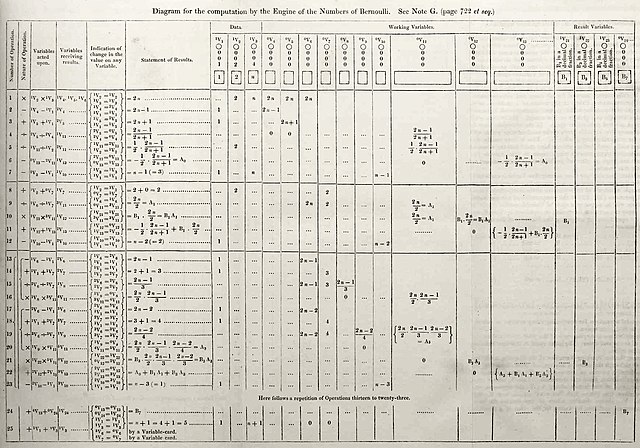
In Babbage’s world his engines were bound by number…what Ada Byron saw—was that number could represent entities other than quantity. So once you had a machine for manipulating numbers, if those numbers represented other things, letters, musical notes, then the machine could manipulate symbols of which number was one instance

Why Languages?
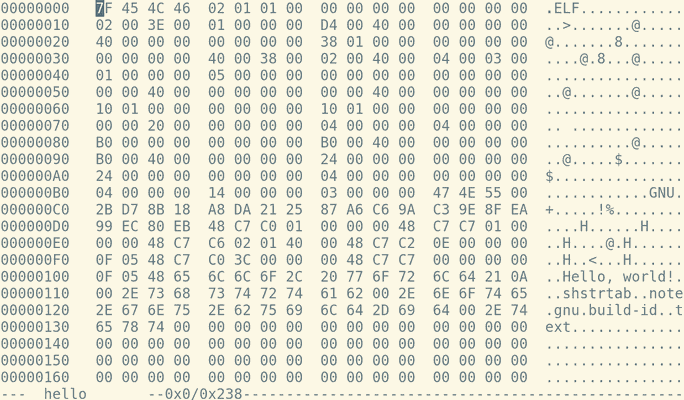
Editing Binaries Manually
objdump -d hellohello: file format elf64-x86-64
Disassembly of section .text:
00000000004000d4 <.text>:
4000d4: 48 c7 c0 01 00 00 00 mov $0x1,%rax
4000db: 48 c7 c7 01 00 00 00 mov $0x1,%rdi
4000e2: 48 c7 c6 02 01 40 00 mov $0x400102,%rsi
4000e9: 48 c7 c2 0e 00 00 00 mov $0xe,%rdx
4000f0: 0f 05 syscall
4000f2: 48 c7 c0 3c 00 00 00 mov $0x3c,%rax
4000f9: 48 c7 c7 00 00 00 00 mov $0x0,%rdi
400100: 0f 05 syscallmov $0x1, %rax
48 c7 c0 01 00 00 00
- 48 - REX prefix
- c7 - mov instruction
- c0 - register rax
- 01 00 00 00 - immediate value

16 x64 Registers
- RAX
- RBX
- RCX
- RDX
- RSI
- RDI
- RSP - Stack Pointer
- RBP - Base Pointer
- R8 - R15
System Calls
- Provide a way to call a function in kernel space
- Examples
- read
- write
- exit
Example of syscall
Compilation and Interpretation 1.4
Compilation
Code is converted to machine code or another executable form

Interpretation
- Code is executed by another program
- Python REPL example
- JS browser REPL example
Compilation and Interpretation
- JITs (e.g. JS)
- Compiled languages with runtimes (e.g. Go)
- VM bytecode (e.g. Java)
C Compilation Steps
- Preprocessing
- Compilation
- Assembly
- Linking
Viewing Intermediate Output
- Preprocessor - hello.i
- Compilation - hello.s
- Assembly - hello.o
- Linking - hello
Preprocessor Output
hello.i is plain text C code and can be inspected.
Compiler Output
hello.s is plain text Assembly and can be inspected
Assembler Output
- hello.o is x64 machine code
- It can be viewed in a hex editor
e.g.
hexedit hello.o - We can also view it’s content using
objdump -d hello.o
Linker Output
hellois x64 machine code- It can be viewed in a hex editor
e.g.
hexedit hello - We can also view it’s content using
objdump -d hello
make
make is a build automation tool
makefiles
Contain a set of directives that instruct make how to create a target.
Example makefile
Lab 1 Solution
Lexing 2.2
Definition
In computer science, lexical analysis, lexing or tokenization is the process of converting a sequence of characters (such as in a computer program or web page) into a sequence of tokens
Tokens
Commonly stored as (name, value) tuples. Example:
Becomes:
(identifier, "my_variable")
(operator, "=")
(integer, 17)
Calculator Example
Supported operations
1 + 24 - 22 * 38 / 4
Goal
- Scan a string such as “1 + 2 * 3” and create a list of (type, value) tuples:
Chomsky Hierarchy
Grammar Automaton (Computer)
- Unrestricted Turing Machines
- Context Free Pushdown Automata
- Regular Finite State Automata
Regular Languages
- Are insufficient to parse most programming languages
- Are useful for parsing tokens
- Can be processed by a simple finite automaton
Deterministic Finite Automaton (DFA)
- Finite set of states \(Q\)
- Finite set of input symbols called the alphabet \(\Sigma\)
- Transition function \(\delta : Q \times \Sigma \rightarrow Q\)
- Initial or start state \(q_0 \in Q\)
- Set of accept states \(F \subseteq Q\)
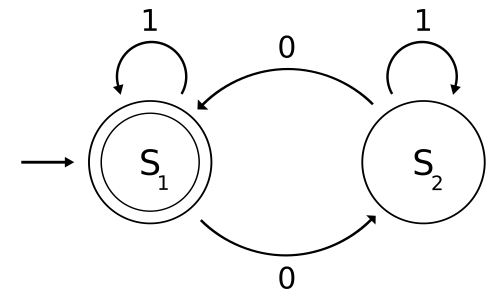
Drawing DFAs
- States are nodes on the graph
- Start state indicated by arrow
- Accept states indicated by double border
- Transitions indicated as labeled arrows
Regular Expressions
A string used as a search pattern for a member of a regular language.
RE Basics
- Characters are generally matched literally.
RE Boolean Or
- Pipes (|) can be used for boolean or
RE Quantifiers
?- zero or one occurrences of preceding element*- zero or more occurrences of preceding element+- one or more occurrences of preceding element{n}- exactly n occurrences of preceding element
RE Grouping
- Parens can be used for grouping
RE Bracket Expressions
- Brackets
[]may be used to match a single character against a set of characters
RE Character Classes
Several special character classes are provided:
\w- alphanumeric characters\d- digits\s- whitespace characters.- anything
DFA RE Equivalence
- A DFA can be created to match any regular expression
- A regular expression can be created to match a language accepted by any DFA
Match Even Number of Zeroes
Simple Lexer in Python
import sys
import re

def lex_one(value):
    if re.match('\d+', value):
        return ('number', value)
    elif re.match('[\+\-\*\/]', value):
        return ('operator', value)
    else:
        raise ValueError(f'Invalid token: {value}')

def lex(text):
    return [lex_one(v) for v in text.split()]
Lexing lab questions?
Parsing 2.3
Parsing or syntax analysis is the process of analyzing a string of symbols conforming to the rules of a formal grammar.
Calculator Example
Supported operations
1 + 24 - 22 * 38 / 4
Goal
- Scan a string such as “1 + 2 * 3” and determine if it is a valid operation, and order it so it can be executed.
Chomsky Hierarchy
Grammar Automaton (Computer)
Unrestricted Turing Machines Context Free Pushdown Automata Regular Finite State Automata
Context-free Languages
Big Idea
- Grammar rules are applied recursively to generate members of the language.
- Grammar rules can be applied in reverse to parse a string to determine language membership.
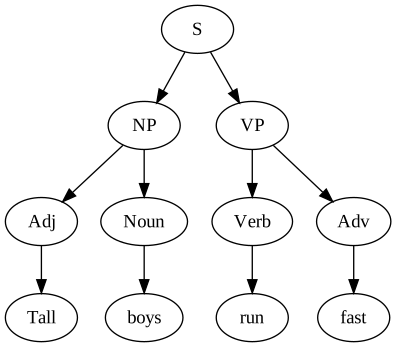
- The parsing process can result in a parse tree showing token structure.
English Example
- S -> NP VP
- NP -> Adj Noun
- NP -> Noun
- VP -> Verb Adv
- VP -> Verb
Implementing a parser

Top-down parsing
- Begins with overall structure (sometimes guessed or assumed) and then determines details
- Top-down refers to order in which nodes in the final parse tree are determined

Bottom-up parsing
- Determines low-level details first then builds our surrounding structure.

Shift-reduce parsing
- Bottom-up
- Shifts tokens onto a stack
- Reduces them when they match against a rule
LR Parsing
- Shift-reduce, bottom-up parse
- Left-to-right, Rightmost derivation first
- Deterministic algorithm
- Linear time performance
Calculator Grammar
- expr -> number
- expr -> expr operator expr
Shift-Reduce Trace
Parsing “1 + 2”
Shift:  1
Reduce: (expr 1)
Shift:  +
Shift:  2
Reduce: (expr 2)
Reduce: (expr (expr 1) + (expr 2))
Result: (expr (expr 1) + (expr 2))
Binding
Names
- A mnemonic character string used to represent something else
- Can refer to variables, constants, types, functions, etc
- Allow programmers to abstract complexity (e.g. memory addresses)
Abstraction
- Hiding details to create clearer interfaces
Control Abstractions
- Hide complex executable code
- Functions, subroutines, and certain macros are examples
Data Abstractions
- Hide data representation details behind simpler operations
- Examples are classes and structs
Binding Time
- A binding is an association between two things
- Binding time refers to the point when the association is created
Possible Binding Times
- Language design time
- Program writing time
- Compile time
- Link time
- Run time
Performance
- As a general rule, making decisions earlier will make final programs more efficient
- Earlier binding times generally improve efficiency
Compile/Link Time
- Bindings are finalized as one of the last steps of the build process
Run Time
- Bindings are not finalized by the time the program begins running
- Bindings may be altered at runtime
Static and Dynamic Binding
- Static - any binding determined before runtime
- Dynamic - any binding determined during runtime
Object Lifetime and Storage
Section 3.2
Key Events
- Creation and destruction of objects
- Creation and destruction of bindings
- Deactivation and reactivation of bindings
Lifetime
- The period between creation and destruction
- Object lifetime and binding lifetime may or may not coincide
References
- Values passed by reference typically have a longer lifetime than their binding
- Dangling references can occur when a reference outlives the object it points to
Storage Allocation Mechanisms
- Static - Absolute addresses and exist throughout execution
- Stack - Allocated and deallocated in LIFO order with matching function calls
- Heap - Allocated and deallocated at arbitrary times
Static Allocation
- Global variables
- Machine code
- Variables declared
static - Can be used for local variables in certain languages (e.g. early Fortran without recursion)
Stack Allocation
- Must be used for local variables to support recursion
- Function instances get their own stack frame for local variables and other data
Calling Sequence
- Prolog - Executed initially to prepare the stack
- Epilog - Executed to put state back as it was before the call
Accessing Stack Variables
- Addresses are not known at compile time
- A frame pointer is created to point to the current stack frame
- Local variable references are offsets to this pointer

Heap Allocation
- Required for dynamically allocated data structures
- Linked data structures (linked lists, trees, graphs, etc)
- Objects of arbitrary size (documents, images, etc)
- Heap management is a complex topic
Language Differences
- Allocation is typically explicit
- Deallocation is explicit in some language (C,Rust,etc)
- Some languages specify that deallocation should happen automatically at runtime using garbage collection
Garbage Collection
- Automatically cleans up objects in memory when they are no longer needed
- Prevents many common classes of memory bugs
- Will have some runtime performance cost
Issues Mitigated by Garbage Collection
- Use after free (dangling references box example)
- Memory leaks
- Hard to debug as the problem does not trigger an exception at the root cause, but causes problems later
Heap Allocation in C
mallocreturns a pointer to allocated heap memoryfreefrees the memory
Example
char* ptr;

// Allocate 100 bytes
ptr = (char*) malloc(100 * sizeof(char));

// Do some things using the memory
// ...

// Free the memory
free(ptr);
Exam in lab, Thursday, March 5th
Scope and Closures
Scope
(Section 3.3)
The textual region of a program where a binding is active
Scope
Can also be used to refer to a region of a program where no bindings are changing
- Blocks e.g. { … }
- Functions
- Modules
Referencing Environment
The set of active bindings
Inspecting the Referencing Environment
import inspect

def main():
  a = 1

  def sub(b):
    c = 3
    print('Locals:', inspect.currentframe().f_locals)
    print('Parent:', inspect.currentframe().f_back.f_locals)

  sub(2)

main()
Locals: {'c': 3, 'b': 2}
Parent: {'sub': <function main.<locals>.sub at 0x7f89903ce268>, 'a': 1}Static (Lexical) Scope
Binding can be determined at compile time
Early Basic
- Global-only scope
- No variable declarations
- Variable names could be only 2 characters (letter + digit)
10 FOR X = 1 TO 10
20 PRINT "HELLO, WORLD"
30 NEXT X
Fortran 77
- Global and subroutine scope
- Subroutines can’t be nested
- Variable declarations are optional (assumed to be
integerif name begins with I-N orrealotherwise)
static variables
- Local variable with lifetime covering entire program execution
- aka
savein Fortran,ownin Algol
Nested Subroutines
- Introduced in Algol 60
- Allow scopes to nest
Closest Nested Scope Rule
- A name is known in its scope and in nested scopes unless it is hidden by another name in a nested scope
Built-ins
- Many languages define built-ins at an outermost scope level
- These can be overwritten in certain languages
Declaration Order
- Some languages require the definition exist prior to it being accessed in a block
- Some languages require all definitions to be present at the start of the block
Section 3.5
Overloading
Some names can refer to multiple objects at a given time
Polymorphism
Allows a subroutine to perform differently based on the types involved
Modules
- Provide a way to bundle object such as subroutines, variables, and classes together
- May not be available unless explicitly exported from one module and imported into another
Python Module Example
Section 3.6
First-class Functions
- Functions themselves can be used just like any other value
- They can be passed as a parameter, returned from a function, etc
Lambda Expressions
- Also called anonymous functions, as they may not have a name
Shallow and Deep Binding
- Shallow binding - A referencing environment is bound when the function is finally called
- Deep binding - A referencing environment is bound when the reference is created
Closures
- A function and its referencing environment created when a reference to a function is created
Control Flow
Control Flow
Dictates the order of program execution
Unstructured Flow
- Control flow is achieved using low-level constructs such as conditional branches and gotos
- Common in assembly languages and some other early languages
Structured Flow
- Gotos begin to be considered evil in the 60s
- We seek better tools to solve control flow problems
- Examples include
if,then,elseandfor
Multi-level Returns
- One “advantage” of goto is that it can jump anywhere in a program, not simply return to the caller
- Sometimes we want to jump outside of our immediate context, and multilevel returns can allow this
Exceptions
- Exception handling is one example of a non-local return
- Execution moves from the point where the exception was raised to the point where the exception is handled
Sequencing
- Core to imperative programming
- Determines order of side effects such as assignment
Compound Statement
- An ordered list of statements that can be used where statements are expected
- Sometimes called blocks
Selection
- Provide a way to select one set of statements based on a condition
- e.g.
iforswitch
Short-circuit Evaluation
- Most modern languages will skip evaluating unneeded arguments in boolean expressions
- This creates more efficient programs
- This can be used for control flow
Switch Statements
- More efficient in hardware than nested conditionals
- Creates a jump table that transfers execution in a single instruction
Iteration
- Allows computers to perform the same task repeatedly
- Makes computers useful for more than fixed-size tasks
- Without some mechanism of iteration or recursion, runtime is linearly coupled to program size
Logically Controlled Loops
- Run a block of code multiple times
- A condition may be used to stop execution
- May be pre-test, post-test, or midtest
- Post-test is most common
Enumeration-Controlled Loops
- Executed once for every value in a finite set
- e.g.
forloop
For loop code generation
Semantic Complications
- Many languages e.g. C allow complex expressions in for loop control conditions
- Machine code for
forloops must often be more complex, as loop count can’t be easily predicted
Recursion
- We can use nested function calls to perform tasks repeatedly
- This can be more readable than iterative solutions
- This can be less performant than iterative solutions
Recursive optimizations
- Some compilers will optimize recursion into iteration removing the need for new stack frames
- In this case, recursion is very efficient
- Tail recursion makes optimization simpler
Tail-recursive version:
Tail Recursion
- No computation takes place after the recursive call
- Can be computed using constant space
- Can be optimized to simple iteration
- More info
Iterators
- Provide a construct to yield successive items
- Also called enumerators
“True” Iterators
- Many languages provide a way to iterate over objects
- A true iterator provides a way to iterate without storing intermediate data structures
Python Iterator
- Includes an
__iter__method that returns an iterator - Includes a
__next__method that returns the next item
Duck Typing
- We can identify the type of an object by its properties
- If it walks like a duck and quacks like a duck, it is a duck
- We can implement and iterator without inheriting from an iterator class
Generators
- Provide a generalized construct for creating iterators
- We can
yieldsuccessive values
Type Systems
Purpose
- Provide implicit context for operations
- Limit the set of valid operations
- Explicit types can make code easier to read
- Types known at compile time can drive performance optimizations
Constructs with Types
- Anything with a value
- Constants
- Variables
- Parameters
- Literals
A type system
- A mechanism to define types
- Set of rules for
- Type equivalence
- Type compatibility
- Type inference
Type Checking
- The process of ensuring that language type rules are followed
- Violations are type clashes
Strong Typing
Strictly enforces valid types and operations
Static Typing
Type rules are enforced at compile time
Example Languages
- Javascript - weak/dynamic
- Python - strong/dynamic
- C - weak/static (types can be coerced, pointer casting, bounds checking, etc)
- Java - strong/static
JavaScript
- Weakly typed
- Dynamically typed
Python
- Strongly typed
- Dynamically typed
C
- Weakly typed
- Statically typed
Polymorphism
- We can design code to work with different types
- This can be achieved in C++ using generics (templates)
#include <iostream>
#include <cstring>

template <typename Type>
Type get_min(Type a, Type b) {
  return a < b ? a : b;
}

template <>
const char* get_min<const char*>(const char* a, const char* b) {
  return std::strcmp(a, b) < 0 ? a : b;
}

int main() {
  std::cout << get_min(2, 1) << std::endl;
  std::cout << get_min("hello", "world") << std::endl;
}
Null
- We often want a way to specify something other than the regular return value
- e.g. popping from and empty stack, dividing by zero, etc
nullis one option, but it can be used differently in different contexts
Rust Option
Type Option represents an optional value: every Option is either Some and contains a value, or None, and does not. Option types are very common in Rust code
Classification of Types
- Booleans
- Numerics
- Enums
- Subrange
- Composite
Enums
Introduced in Pascal:
Subrange
Also introduced in Pascal:
Composite Types
- Records (structs) - introduced by COBOL
- Arrays
- Sets
- Lists
- Files
Composite Types
Records (structs)
- Allows different types to be stored and accessed together
- Individual fields are typically accessed using
.notation.
Struct Packing
On most systems, the layout of items in a struct can change the storage space requirements due to alignment constraints.
Arrays
- Used to group a number of items of the same type
Strings
- Most typically an array of characters
Sets
- Store an arbitrary number of distinct values of the same type
Lists
- Hold a number of elements of the same type
- Typically differ from arrays in their allocation mechanism
- Lists will scale dynamically while arrays are fixed
Have you ever needed to write code to remove duplicate elements from a list?
The difference between a bad programmer and a good one is whether they consider their code or their data structures more important. Bad programmers worry about the code. Good programmers worry about data structures and their relationships.
- Linus Torvalds
Homogeneous types
- Languages may differ in whether they allow different types to be used in certain composite types (e.g. lists and sets)
- ML and Haskell are homogeneous, many others are heterogeneous
Type Checking
- Type equivalence - Types are the same
- Type compatibility - Types can be used interchangeably
- Type Inference - Determining types automatically
Type Equivalence
- Structural equivalence - based on content
- Name equivalence - based on lexical occurrence of type definitions
Type Compatibility
- Types don’t need to always be fully equivalent to be used
- Coercion is used to convert from one type to another
Universal Reference Types
- Most languages provide a universal reference that can point to any object
- Examples in include
voidin C,Objectin Java, andobjectin C#
Let’s revisit our previous C container example to use void.
#include <stdio.h>

typedef struct {
  int inner;
} ContainerA;

typedef struct {
  int inner;
} ContainerB;

// Use void to accept any pointer
void increment(void* container) {
  // Cast pointer to ContainerB type
  ((ContainerB*)container)->inner += 1;
}

int main() {
  ContainerA container = {0};
  increment(&container);

  printf("Number %d\n", container.inner);
}
Type Inference
- We can determine types without specifying them
C++ provides the auto keyword to infer types
Some languages are statically typed while providing type inference such that explicit types are rarely required. Examples are ML, Haskell, and Rust.
fn main() {
    let elem = 5u8;
    // The compiler knows that `elem` has type u8

    let mut vec = Vec::new();
    // The compiler doesn't yet know the exact type of `vec`
    // It just knows that it's a vector (`Vec<_>`)

    vec.push(elem);
    // Aha! Now the compiler knows that
    // `vec` is a vector of `u8`s (`Vec<u8>`)

    println!("{:?}", vec);
}
Equality Testing
- How do we know if you two values are equal?
- Compare values
- Compare references
Shallow vs Deep Compare
- Shallow - We check to see if references point to the same object
- Deep - We check to see if objects hold the same values
#include <stdio.h>
#include <string.h>
#include <stdlib.h>

void main(void) {
  char * a = malloc(6);
  char * b = malloc(4);
  strcpy(a, "Alice");
  strcpy(b, "Bob");

  // Shallow compare
  printf("%d\n", a == b); // False
  printf("%d\n", a == a); // True

  // Undefined behavior, typical results provided
  printf("%d\n", a == "Alice"); // False
  printf("%d\n", a != "Bob"); // True

  // Deep compare
  printf("%d\n", strcmp(a, a) == 0); // True
  printf("%d\n", strcmp(a, b) == 0); // False
  printf("%d\n", strcmp(a, "Alice") == 0); // True
}
Enum lab questions?
Control Abstraction
Abstraction
- Allows us to hide complexity behind simpler interfaces
Data Abstraction
- Create complex data structures with simple interfaces to pass around (e.g. records, structs, dictionaries, etc)
Control Abstraction
- Create organized sections of executable code that execute in well-understood ways and can be reused
Subroutine
- Performs operations for the caller while the caller waits
- Arguments, or actual parameters, are passed to subroutines and mapped to formal parameters from the subroutine definition
- Subroutines that can return values can be called functions
Call Stack
- Memory space for functions to use to store local variables, return addresses, and other data
- Function calls push a new frame to the stack
- Returns pop their frame when they are finished with it
Call stack review resources
Parameter Passing
Pass by Value
- Actual parameter values are made available to the subroutine
- Modification of values will not impact the caller
- This may involved making a copy in memory
Pass by Reference
- Actual parameters are references to data from the caller
- Modification of values will impact caller
- Should not involve copying data
C
- Pass by value
- If we want to be able to modify values, we need to pass values by reference
- We can’t do this is C, but we can use pointers passed by value to emulate it
If we allow C++, we can use a proper pass by reference mode.
Python
- Pass by object reference
- Numbers and strings are passed by value
- Composite types such as objects are passed as a reference
Callers will be able to see modifications to mutable objects
Callers will still hold a reference to the exact same object
Immutable objects (such as tuples or strings) can’t be modified for the caller
Optional Parameters
- Some languages allow us to mark parameters as optional
- We may be able to provide a default value
- In some languages all parameters are optional
Python allows us to annotate optional parameters by providing default values
All parameters are optional in Javascript
Named Parameters
- We’ve been exploring positional parameters
- Some languages allow them to be used by name
- This can be very helpful, especially combined with optional parameters
Variable Numbers of Arguments
- It can sometimes be helpful to accept a different number of arguments
- One example of this is
printfin C
Function Returns
- End the function
- Return some value
- In languages without separate statements, the return is simply the value of the function body
- Some languages allow for implicit returns
Events
- Event happens outside of program at unpredictable times
- Running programs wants to respond
Blocking
- We simply wait for an event to complete
Async events example
Final Exam
- Exam Schedule
- CPSC 2430 exam will be 3pm on Tuesday, May 5th
Object-Oriented Programming
Abstraction
- Allows us to hide complexity behind simpler interfaces
Data Abstraction
- Create complex data structures with simple interfaces to pass around (e.g. records, structs, dictionaries, etc)
Control Abstraction
- Create organized sections of executable code that execute in well-understood ways and can be reused
Classes
- Allow programmers to define a group of related abstractions (objects)
- Programming techniques built around classes are considered object-oriented
- Combine control and data abstraction
Data Members
- Provide data abstraction
- Hold data used by objects
- Also known as
fieldsorproperties
Subroutine Members
- Provide control abstraction
- Subroutines and functions that objects can run
- Also known as
methods
Constructors
- Called to instantiate class object
this and self
- Provide explicit reference to class instance
Why Classes?
- We can define new abstractions as extensions or refinements of existing abstractions via inheritance
Liskov Substitution Principle
Objects in a program should be replaceable with instances of their subtypes without altering the correctness of that program.
Inheritance Example
class Asset:
    """
    Represents some asset and provides methods to operate on it

    >>> bitcoin = Asset(1, appreciation=1)
    >>> int(bitcoin.future_value(years=10))
    1024
    >>> int(bitcoin.change_in_value(years=10))
    1023
    """

    def __init__(self, value, appreciation):
        self.value = value
        self.appreciation = appreciation

    def future_value(self, years):
        return self.value * (1 + self.appreciation) ** years

    def change_in_value(self, years):
        return self.future_value(years) - self.value


class House(Asset):
    """ Represents a real estate asset

    >>> house = House(100000, appreciation=.01, maintenance=.02, tax=.03, utilities=100)
    >>> int(house.operating_cost(10))
    53311

    >>> int(house.tco(10))
    42848
    """

    def __init__(self, value, appreciation=0.02, maintenance=0.02, tax=0.01, utilities=200):
        super().__init__(value, appreciation)
        self.maintenance = maintenance
        self.tax = tax
        self.utilities = utilities

    def operating_cost(self, years):
        maintenance = sum(self.future_value(y) * self.maintenance for y in range(years))
        tax = sum(self.future_value(y) * self.tax for y in range(years))
        return maintenance + tax + self.utilities * years

    def tco(self, years):
        return -self.change_in_value(years) + self.operating_cost(years)


class Vehicle(Asset):
    """
    Represents a vehicle of some type

    >>> car = Vehicle(16000, appreciation=-.2, maintenance=500, mpg=22)
    >>> int(car.tco(years=5))
    20075
    >>> car = Vehicle(16000, appreciation=-.2, maintenance=500, mpg=38)
    >>> int(car.tco(years=5))
    17204
    """

    def __init__(self, value=16000, appreciation=-0.25, maintenance=300, mpg=25):
        super().__init__(value, appreciation)
        self.maintenance = maintenance
        self.mpg = mpg

    def operating_cost(self, years, miles_per_year=10000, gas_price=3.0):
        return self.maintenance * years + miles_per_year / self.mpg * gas_price * years

    def tco(self, years):
        return -self.change_in_value(years) + self.operating_cost(years)

if __name__ == '__main__':
    house = House(100000, appreciation=0.04, tax=.01, maintenance=.02)
    print("House", house.tco(10))

    car = Vehicle(35000, appreciation=-0.20, mpg=22)
    print("Car", car.tco(10))

    car = Vehicle(8000, appreciation=-0.10, mpg=35)
    print("Budget car", car.tco(10))
Favor composition over inheritance
Inheritance
- Represents an is-a relationship
- Encourages chains of inheritance and attempting to fit arbitrary problems into an inheritance model
Composition
- Represents a has-a relationship
- Encourages combining multiple classes as members of one another
Rust Trait Example
struct Asset<T> {
  value: f64,
  appreciation: f64,
  costs: T,
}

impl<T> Asset<T> {
  fn future_value(&self, years: u32) -> f64 {
    self.value * (1.0 + self.appreciation).powi(years as i32)
  }

  fn change_in_value(&self, years: u32) -> f64 {
    self.future_value(years) - self.value
  }
}

trait OperatingCost {
  fn calculate(&self, asset_value: f64, appreciation: f64, years: u32) -> f64;
}

struct HouseCosts {
  maintenance_rate: f64,
  tax_rate: f64,
  utilities: f64,
}

impl OperatingCost for HouseCosts {
  fn calculate(&self, asset_value: f64, appreciation: f64, years: u32) -> f64 {
    let mut total = 0.0;
    for y in 0..years {
      let current_val = asset_value * (1.0 + appreciation).powi(y as i32);
      total += current_val * (self.maintenance_rate + self.tax_rate);
    }
    total + (self.utilities * years as f64)
  }
}

struct VehicleCosts {
  annual_maintenance: f64,
  mpg: f64,
}

impl OperatingCost for VehicleCosts {
  fn calculate(&self, _asset_value: f64, _appreciation: f64, years: u32) -> f64 {
    let miles_per_year = 10000.0;
    let gas_price = 3.0;
    let annual_gas = (miles_per_year / self.mpg) * gas_price;
    (self.annual_maintenance + annual_gas) * years as f64
  }
}

impl<T: OperatingCost> Asset<T> {
  fn total_cost_of_ownership(&self, years: u32) -> f64 {
    let costs = self.costs.calculate(self.value, self.appreciation, years);
    -self.change_in_value(years) + costs
  }
}

fn main() {
  let house_asset = Asset {
    value: 100000.0,
    appreciation: 0.04,
    costs: HouseCosts {
      maintenance_rate: 0.02,
      tax_rate: 0.01,
      utilities: 200.0,
    },
  };

  let car_asset = Asset {
    value: 35000.0,
    appreciation: -0.20,
    costs: VehicleCosts {
      annual_maintenance: 300.0,
      mpg: 22.0,
    },
  };

  let budget_car_asset = Asset {
    value: 8000.0,
    appreciation: -0.10,
    costs: VehicleCosts {
      annual_maintenance: 300.0,
      mpg: 35.0,
    },
  };

  println!("House TCO: {}", house_asset.total_cost_of_ownership(10));
  println!("Car TCO: {}", car_asset.total_cost_of_ownership(10));
  println!("Budget Car TCO: {}", budget_car_asset.total_cost_of_ownership(10));
}
Functional Languages
- First-class functions and higher order functions
- Extensive Polymorphism
- List types and operations
- Garbage Collection
In modern languages, the lines between language families often have overlap
First-class Functions
Functions can be passed as values
Higher Order Functions
Functions that accept functions as parameters
Each
- Executes a function on each item in a list
- Returns nothing
Map
- Executes a function on each item in a list
- Returns a new list of the results
Filter
- Executes a function on each item in a list
- Returns a new list containing only items where the function evaluated to true
Every
- Executes a function on every item in a list
- Returns true if the function always evaluates to true
Reduce
- Executes a function on each item in a list and accumulates a single value
- Returns the final accumulated value
Purity
- A function is said to be “pure” if it has no side effects
- Side effects may include changing global state or performing I/O
- Benefits include consistency and testability
Memoization
- We can sometimes optimize the performance of pure functions by caching their outputs
History
Lambda Calculus
- Formal mathematical basis for computation introduced by Alonozo Church
- Provably equivalent to a Turing Machine (Church-Turing thesis)
- Not a programming language, but provides framework for computation and functional programming
Lisp
- First functional language (1958)
- Designed by John McCarthy and implemented by others (Steve Russell created the first working interpreter)
- Lisp is still used today in various forms (Scheme, Common Lisp, Clojure, etc)
- Lisp influenced many other modern languages (JavaScript, Python, Ruby, etc)
Miranda and Haskell
- Emerged in the 80s as modern functional languages
- Haskell is open and used for functional programming research
Python
- Emerged in 1991 and was heavily influenced by Haskell
- Multi-paradigm language incorporating ideas from various programming languages
JavaScript
- Created in 1995
- Brendan Eich was hired by Mozilla to implement Scheme for use in web pages
- This project quickly shifted to the creation of Javascript
- Glue language with Java syntax
- Includes first-class functions and closures
Self-passing
Declarative Languages
Declarative Programming
We express the logic of our program without specifying its control flow
- Declarative - Focuses on the what
- Imperative - Focuses on the how
Examples
- Logic languages
- Purely functional languages
- Query languages
- Domain specific languages
Logic Programming
- Uses formal logic to solve problems
- Programs are made up of facts and rules
- Logic languages are covered in detail in Chapter 12
Query Languages
- You’ve likely already encountered SQL
- This languages allows us to frame requests for data in terms of the data we want, not how it will be retrieved
/* Create users */
create table users (
  userid integer primary key,
  name text
);
insert into users values
  (1,'Alice'),
  (2,'Bob'),
  (3,'Carol'),
  (4,'Dan'),
  (5,'Eve'),
  (6,'Frank');

/* Create chat message */
create table messages (
  userid integer,
  content text
);
insert into messages values
  (2,'Does anyone know how modify a record in a SQL DB?'),
  (6,'Everyone knows how to do this'),
  (3,'Have you tried `UPDATE`?'),
  (2,'Nope. What does that do?'),
  (3,'It updates a record in a SQL DB...'),
  (2,'Oh cool. I will try that.'),
  (3,'Good luck!'),
  (5,'wat up, nerds!'),
  (4,'Is there any way to link records between two tables?'),
  (6,'Of course there is'),
  (1,'I think that you are looking for a `JOIN`'),
  (4,'Ah. Thanks!'),
  (1,'No problem.');

select "
  Display messages in order";
select userid, content
  from messages;


select "
  Display messages with usernames";

select name, content
  from messages
  natural join users;

select "
  Display messages with usernames in reverse order";

select name, content
  from messages
  natural join users
  order by messages.rowid desc;

select "
  Show Dan's messages using a `where` clause";

select name, content
  from messages
  natural join users
  where name='Dan';

select "
  Show query plan (imperative program to complete query)";
explain query plan
select name, content
  from messages
  natural join users
  where name='Dan';

select "
  Create indexes to improve query plan";
create index messages_userid_idx on messages(userid);
create index users_name_idx on users(name);

select "
  Show new query plan";
explain query plan
select name, content
  from messages
  natural join users
  where name='Dan';


select "
  Change Dan's name to Dave";

update users
  set name = 'Dave'
  where name = 'Dan';

select name, content
  from messages
  natural join users;

select "
  Delete Eve's messages";

delete from messages
  where userid = (
    select userid
    from users
    where name = 'Eve'
  );

select name, content
  from messages
  natural join users;
Domain Specific Languages
Make
- The language that you’ve used to create makefiles is declarative
- You aren’t telling make what to do to build your program
- You are providing a list of targets and their dependencies, and make determines how to resolve the dependencies
all: main

main: main.c
  gcc main.c -o main
CSS
- Declarative DSL used to provide style information
- Describes what style an element should have without specifying how to apply it.
Hardware Description Languages
Language used to describe the behavior of electronic circuits.