DFAs
Chomsky Hierarchy
Grammar Automaton (Computer)
Unrestricted Turing Machines Context Free Pushdown Automata Regular Finite State Automata
Regular Languages
- Are insufficient to parse most programming languages
- Can be processed by a simple finite automaton
Deterministic Finite Automaton (DFA)
- Finite set of states \(Q\)
- Finite set of input symbols called the alphabet \(\Sigma\)
- Transition function \(\delta : Q \times \Sigma \rightarrow Q\)
- Initial or start state \(q_0 \in Q\)
- Set of accept states \(F \subseteq Q\)
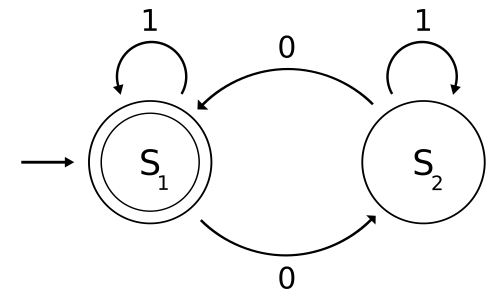
Drawing DFAs
- States are nodes on the graph
- Start state indicated by arrow
- Accept states indicated by double border
- Transitions indicated as labeled arrows
Regular Expressions
Counting Characters
- Count modifiers can be appended to character classes
- One more more can be matched using
+ - Zero or more can be matched using
*
Exercise
Create a single, concise regular expression to match a string with 0
or more a’s followed by at least 1 b followed
by at least 1 c. Examples:
abcbcaabbcc
These should not match:
acbac
match
- Match will return
Trueif a string matches from the beginning
Example
Search
- We have seen that regular expressions can be used for search using
matchorsearch
Example
Data Extraction
- Regular expressions can be used to extract many matches
- The
findallfunction can be used for this purpose
Example
Metacharacters
- Certain characters, such as
.are not matched literally - The full list of metachars is:
. ^ $ * + ? { } [ ] \ | ( )
Character classes
- We can search for groups of characters to match against a single
character using
[] - We can use “
-” to indicate a range of characters
Example
Common Classes
\d- any decimal digit\s- any whitespace\S- any non-whitespace\w- any alphanumeric
Example
Fuzzy matching
- We can use more permissive expressions to capture values in multiple formats
Example
Substitutions
subcan be used to perform regex replacements
Example
Extraction
- Parens
()can be used to indicate which portion of an expression to extract
Example
Exact counts
- Brackets
{}can be used to specify an exact count on the preceding character class
Example
Example
Match Objects
searchreturns a match object on success- Groups can be extracted from the match
Example
Group 0
- Match group
0is always the full match